Prepare the C# hands-on environment
Lab briefing
Original concept illustration (SVG)
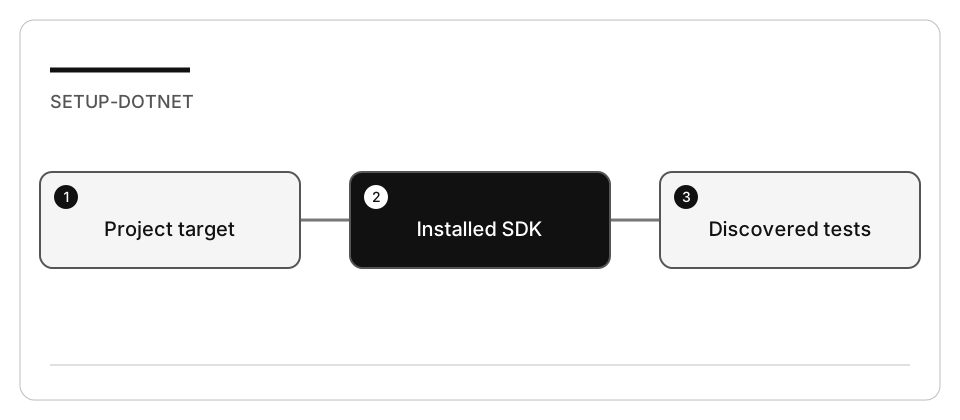
| At a glance | Your route |
|---|---|
| Level and time | 100; 20 minutes (facilitation estimate) |
| Starting action | Open one C# fixture and compare its target framework with the installed runtimes. |
| Learner materials | Download 02-csharp.zip |
| Workspace | Open the extracted kit root; run the baseline from . relative to that root |
| Expected initial check | The supplied tests pass. New feature requirements still need their own tests. |
| Setup help | Download, extract, local Git and optional GitHub |
[!NOTE] A compiled project and an executed test suite are different evidence.
Concepts · First task · Evidence checklist · Reset
Learning objectives
- Distinguish an installed SDK from the target runtime a project needs.
- Build one copied project without touching other workspaces.
- Verify test discovery rather than assuming compilation is testing.
Before you start
Read work-drive setup and resource limits. The integrated C# fixtures target .NET 10. C# Dev Kit is useful for editor test discovery; command-line builds and tests remain the reproducible baseline.
Concepts and use cases
dotnet build compiles a project. dotnet test discovers and executes its tests.
dotnet run starts the application and may depend on the current working directory.
A newer SDK alone does not mean every older runtime is installed.
Exercise scenario
Prepare the library fixture for investigation, not a new console template or a global configuration change.
Task 1 - Verify the selected tools
- Inspect the runtime required by the selected fixture’s
.csproj. - Run
dotnet --list-sdksanddotnet --list-runtimes. - If the required runtime is missing, use your organization’s approved installation route or the repository Dev Container. Do not install every SDK.
- Verify Git and the VS Code C# extension if using editor features.
- For Copilot access, use the account setup lab.
Task 2 - Prepare and build one fixture
-
From the curriculum root:
node scripts/prepare-hands-on.js --lab 02-csharp --destination /Volumes/T9/Dev/oss/workshop-runs/02-csharp -
Open the printed directory alone.
-
With the work-drive cache variables set, run from that copy’s root:
dotnet build src/Library.Console/Library.Console.csproj -m:1 -p:UseSharedCompilation=false dotnet test tests/UnitTests/UnitTests.csproj -m:1 -p:UseSharedCompilation=false --list-tests dotnet test tests/UnitTests/UnitTests.csproj -m:1 -p:UseSharedCompilation=false -
Record discovered tests, exit codes, and any warnings. A missing feed/network dependency is an environment blocker, not evidence of a failed domain test.
-
Do not add the same NuGet source repeatedly or change global feed configuration.
Check yourself
dotnet build succeeds and dotnet test reports no failures, but --list-tests prints zero tests. What do you record as evidence?
Choose an answer to see why it holds or fails.
- Nothing ran yet: fix discovery first, because zero discovered tests is not a passing suite. dotnet test discovers and executes tests; with zero discovered, the run proves compilation only, not a passing suite.
- Record the successful build as the test evidence, since the test command returned exit code 0. The lab asks for discovered tests as well as exit codes, and calls a compiled project and an executed suite different evidence.
- Install every available .NET SDK, since zero tests means the required runtime is missing. The lab says not to install every SDK, and adding SDKs does not make a test project discover tests.
Verify your work
- The project target and installed runtime agree.
- The console project builds and the test project discovers actual tests.
- Test output is recorded separately from build output.
- Caches and generated files remain on the selected work drive.
Troubleshooting
If appSettings.json is missing when running the console app, change to
src/Library.Console in the disposable copy before running it. If tests are absent
in the editor, select/build the test project and refresh discovery; do not equate
“zero tests” with success.
Independent practice
Explain why --no-restore is appropriate after a successful restore but not on a
fresh checkout. Demonstrate the difference without installing a new test framework.
Reset
Close the fixture window. Keep shared SDKs intact. Remove only the inspected disposable copy if no evidence or changes need preservation.